> ## Documentation Index
> Fetch the complete documentation index at: https://docs.topsort.com/llms.txt
> Use this file to discover all available pages before exploring further.

# Kampagnenerstellung

export const LastUpdatedDe = ({date}) => {
  const label = "Zuletzt aktualisiert:";
  return <>
      <style>{`
        .last-updated-component {
          display: inline-flex;
          align-items: center;
          gap: 8px;
          padding: 10px 16px;
          border-radius: 8px;
          margin-top: 12px;
          margin-bottom: 16px;
          font-size: 14px;
          background-color: rgba(0, 0, 0, 0.05);
          border: 1px solid rgba(0, 0, 0, 0.12);
          color: rgba(0, 0, 0, 0.75);
          line-height: 1;
        }

        .last-updated-component svg {
          flex-shrink: 0;
          vertical-align: middle;
        }

        .last-updated-component span {
          display: inline-flex !important;
          align-items: center !important;
          line-height: 1 !important;
        }

        [data-theme="dark"] .last-updated-component {
          background-color: #3a3a3a;
          border: 2px solid #888888;
          color: #ffffff;
        }

        [data-theme="dark"] .last-updated-component svg {
          stroke: #ffffff;
        }
      `}</style>
      <div className="last-updated-component">
        <svg width="16" height="16" viewBox="0 0 24 24" fill="none" stroke="currentColor" strokeWidth="2" strokeLinecap="round" strokeLinejoin="round">
          <circle cx="12" cy="12" r="10" />
          <polyline points="12 6 12 12 16 14" />
        </svg>
        <span>
          <strong style={{
    fontWeight: 600
  }}>{label}</strong> 
          <time dateTime={date}>{date}</time>
        </span>
      </div>
    </>;
};

<div style={{ textAlign: "justify", marginBottom: "1.5rem" }}>
  Topsort ermöglicht die Erstellung von 4 Kampagnentypen:
</div>

<div style={{ textAlign: "justify", marginBottom: "1.5rem" }}>
  1. **[Gesponserte Anzeigen](/de/knowledge-base/ad-platform/listings/)** Erhöhen
     Sie die Produktsichtbarkeit durch Platzierung von Anzeigen in stark frequentierten Bereichen wie
     Suchergebnissen und Kategorieseiten.
</div>

<div style={{ textAlign: "justify", marginBottom: "1.5rem" }}>
  2. **[Banner-Anzeigen](/de/knowledge-base/ad-platform/banners/banner-ads-campaigns/)** Zeigen
     Sie Kreativmaterialien auf Startseiten, Kategorieseiten oder während des Checkout-Prozesses an, um
     die Aufmerksamkeit der Nutzer zu erregen und Markenbekanntheit zu schaffen.
</div>

<div style={{ textAlign: "justify", marginBottom: "1.5rem" }}>
  3. **[Video-Anzeigen](/de/knowledge-base/ad-platform/video-ads/)** Binden Sie
     Käufer mit Kurzvideos ein, die für Platzierungen in verschiedenen Bereichen der Website geeignet sind.
</div>

<div style={{ textAlign: "justify", marginBottom: "1.5rem" }}>
  4. **[Gesponserte Marken](/de/knowledge-base/ad-platform/sponsored-brands/)**
     Kombinieren Sie Markenlogos, überzeugende Überschriften und ausgewählte Produkte, um
     die Markenbekanntheit und Produktentdeckung zu verbessern.
</div>

<div style={{ textAlign: "justify", marginBottom: "1.5rem" }}>
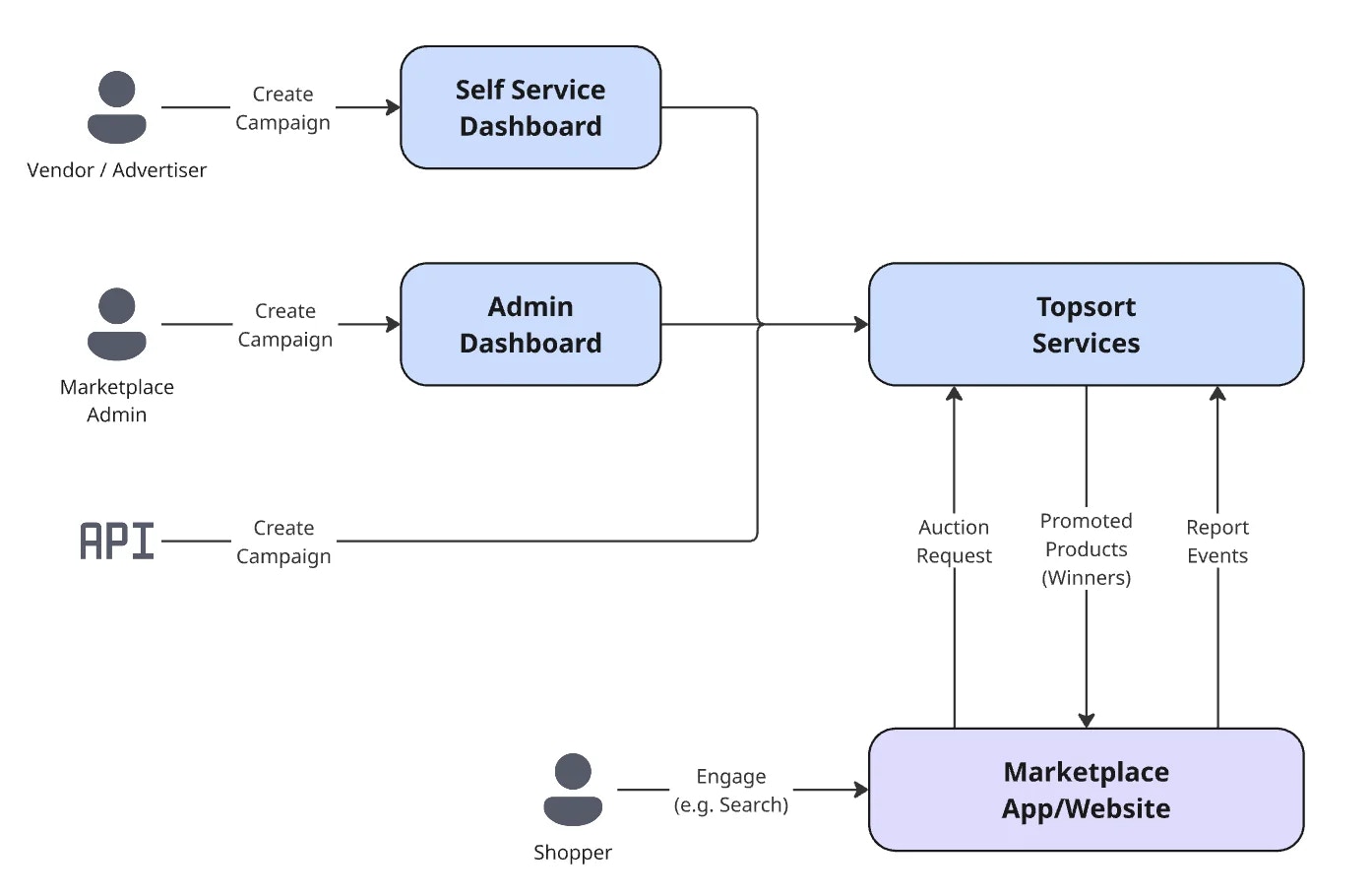
  Alle Kampagnen können vom Administrator über das Topsort-Dashboard oder mithilfe
  unserer API erstellt werden. Anbieter können auch Kampagnen erstellen, wenn der Self-Service-Modus
  aktiviert ist.
</div>

<Frame>
  <img src="https://mintcdn.com/topsort/FVdFH6-GAInpFZWG/images/knowledge-base/ad-platform-campaign-creation-diagram.webp?fit=max&auto=format&n=FVdFH6-GAInpFZWG&q=85&s=2b91f6bc7d9eee2130b7c38ea4325961" alt="Diagramm des Administrator-Dashboards zur Verwaltung von Werbekampagnen." width="1394" height="910" data-path="images/knowledge-base/ad-platform-campaign-creation-diagram.webp" />
</Frame>

***

<LastUpdatedDe date="2025-12-15" />
