> ## Documentation Index
> Fetch the complete documentation index at: https://docs.topsort.com/llms.txt
> Use this file to discover all available pages before exploring further.

# Frequency Capping

> Wie Frequency Capping funktioniert

export const LastUpdatedDe = ({date}) => {
  const label = "Zuletzt aktualisiert:";
  return <>
      <style>{`
        .last-updated-component {
          display: inline-flex;
          align-items: center;
          gap: 8px;
          padding: 10px 16px;
          border-radius: 8px;
          margin-top: 12px;
          margin-bottom: 16px;
          font-size: 14px;
          background-color: rgba(0, 0, 0, 0.05);
          border: 1px solid rgba(0, 0, 0, 0.12);
          color: rgba(0, 0, 0, 0.75);
          line-height: 1;
        }

        .last-updated-component svg {
          flex-shrink: 0;
          vertical-align: middle;
        }

        .last-updated-component span {
          display: inline-flex !important;
          align-items: center !important;
          line-height: 1 !important;
        }

        [data-theme="dark"] .last-updated-component {
          background-color: #3a3a3a;
          border: 2px solid #888888;
          color: #ffffff;
        }

        [data-theme="dark"] .last-updated-component svg {
          stroke: #ffffff;
        }
      `}</style>
      <div className="last-updated-component">
        <svg width="16" height="16" viewBox="0 0 24 24" fill="none" stroke="currentColor" strokeWidth="2" strokeLinecap="round" strokeLinejoin="round">
          <circle cx="12" cy="12" r="10" />
          <polyline points="12 6 12 12 16 14" />
        </svg>
        <span>
          <strong style={{
    fontWeight: 600
  }}>{label}</strong> 
          <time dateTime={date}>{date}</time>
        </span>
      </div>
    </>;
};

<div style={{textAlign: 'justify', marginBottom: '1.5rem'}}>
  Frequency Capping ermöglicht es Werbetreibenden zu kontrollieren, wie oft ein einzelner Nutzer dieselbe Anzeige sieht. Es schafft ein weniger störendes Erlebnis für Nutzer, indem verhindert wird, dass sie dieselbe Anzeige mehrfach sehen, was auch dazu beiträgt, dass Anzeigen besser performen, indem Überexposition vermieden wird. Diese Funktion sorgt außerdem für eine effizientere Budgetnutzung und hilft dabei, Anzeigenimpressionen gleichmäßiger auf die Zielgruppe zu verteilen.
</div>

## Wie es funktioniert

<Steps>
  <Step title="Kampagnen-Setup">
    <div style={{textAlign: 'justify', marginBottom: '1.5rem'}}>
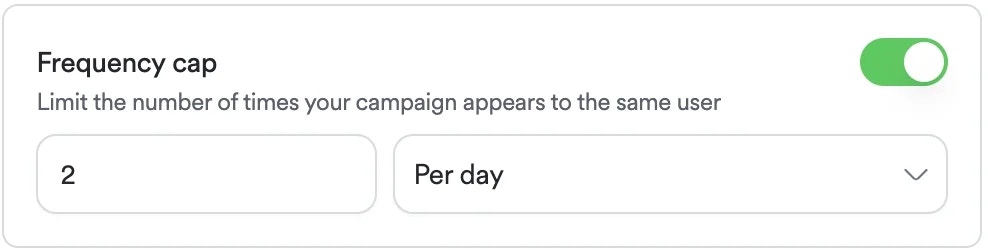
      Aktivieren Sie beim Erstellen der Kampagne "Frequency Capping" und legen Sie fest, wie oft ein Nutzer die Anzeige innerhalb eines bestimmten Zeitraums (pro Tag oder pro Woche) sehen kann. Das System verfolgt die Aufrufe für jeden Nutzer, und wenn ein Nutzer das Limit in diesem Zeitraum erreicht, zeigt das System ihm diese Anzeige nicht mehr an, bis der Zeitraum endet.
    </div>

    <div style={{textAlign: 'justify', marginBottom: '1.5rem'}}>
      **<Frame>      <img src="https://mintcdn.com/topsort/FVdFH6-GAInpFZWG/images/knowledge-base/ad-platform-campaign-targeting-frequency-cap.webp?fit=max&auto=format&n=FVdFH6-GAInpFZWG&q=85&s=b49023c6a3bbdfec589d433a5dcb8396" alt="Screenshot der Frequency Capping Funktion." width="988" height="250" data-path="images/knowledge-base/ad-platform-campaign-targeting-frequency-cap.webp" /></Frame>**
    </div>
  </Step>

  <Step title="Auktionsprozess">
    <div style={{textAlign: 'justify', marginBottom: '1.5rem'}}>
      Diese Funktion erfordert, dass der Kunde die `opaqueUserId` des Nutzers in Anzeigenanfragen sendet. Die folgende Auktionsanfrage kann verwendet werden.
    </div>

    ```json theme={null}
    {
      "auctions": [
        {
          "type": "banners",
          "slots": 1,
          "slotId": "homepage_banner",
          "device": "mobile",
          "opaqueUserId":"0000488787_0681bb44-8553-41f3-a912-ca526afab323"
        }
      ]
    }
    ```
  </Step>
</Steps>

***

<LastUpdatedDe date="2025-11-18" />