

Connecting Topsort with Digital Asset Management Systems
Digital Asset Management (DAM) systems like Adobe Experience Manager
Assets, Bynder, and others centralize creative assets and generate optimized
URLs for campaign use. Unlike OMS connectivity, DAM connectivity is currently
feasible with Topsort’s existing APIs.
This guide explains how to integrate Topsort’s APIs with DAM systems for
streamlined creative workflows and automated asset management.


How DAM Systems Work with Topsort
DAM systems like Adobe Experience Manager Assets, Bynder, or Webdam:
- Centralize Assets: Store all banners, product images, videos in one organized repository
- Generate CDN URLs: Create optimized, publicly accessible URLs for each asset
- Manage Versions: Track approved versions and prevent outdated assets from being used
- Control Brand Compliance: Ensure only approved, on-brand assets reach campaigns
Workflows
DAM integration involves four distinct workflows for different roles and
timing:
Creating Banner Campaigns with DAM Assets
UI Workflow
Role: Vendors/Marketplace Admins | Frequency: Per campaign setup
**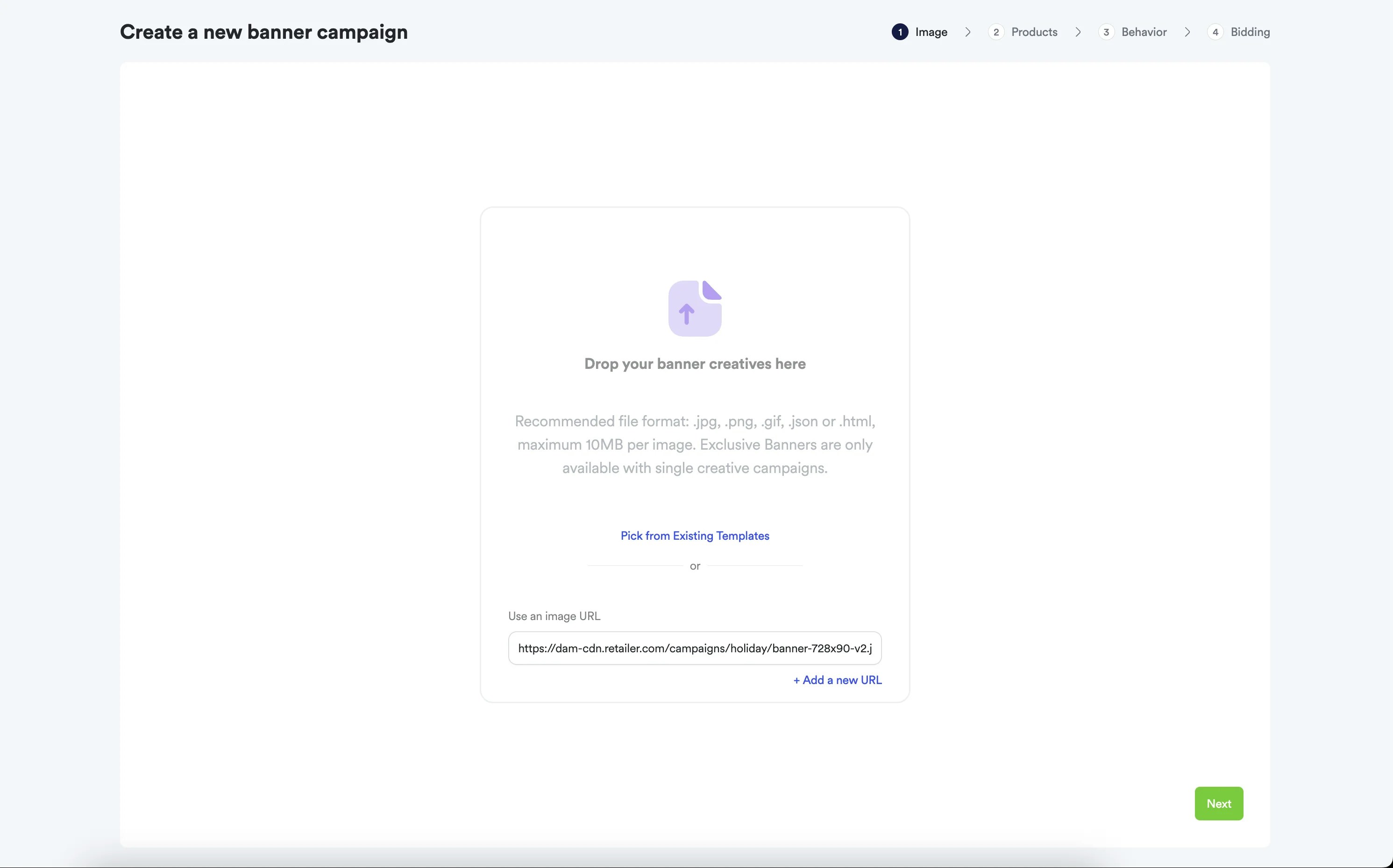
For creating banner campaigns with external DAM URLs through the Ad
Platform, refer to the comprehensive
Banner Ads Campaigns
guide which
shows the step-by-step UI process including how to reference external URLs in
campaign setup.
API Workflow: Complete Banner Campaign Creation
Role: Campaign Managers/Advertisers | Frequency: Per campaign setup
1
Create Asset with DAM URL
First, create an asset in Topsort that references your DAM URL:
2
Create Banner Campaign Using the Asset
Next, create a banner campaign that references the asset you just created:
Auction Response with DAM URLs
Role: Marketplace Developers | Frequency: Every page load
1
Run Auction for Banner Slot
Request an auction for the banner slot where your DAM-based campaign can compete:
2
Receive DAM URL in Response
When your banner campaign wins, the auction response includes the original DAM URL:
3
Render Banner with DAM Asset
Use the returned URL to display the banner and track performance:
Key Benefits of DAM Integration
- Brand Consistency: Only approved, compliant assets reach ad campaigns - Workflow Efficiency: Creative teams work in familiar DAM tools, assets sync automatically - Version Control: When creatives update in DAM, campaign assets update automatically - Rights Management: Track usage licensing and prevent expired assets from being used - Global Asset Distribution: One asset repository serves multiple marketing channels
Implementation Guide
Role: DevOps/Integration Team | Frequency: One-time setup
1
DAM System Preparation
Set up your DAM system for optimal connectivity with Topsort:
- Asset Organization: Structure assets with campaign-specific folders and metadata
- CDN Configuration: Ensure DAM generates publicly accessible, optimized URLs
- Approval Workflows: Set up processes to mark assets as campaign-ready
- Metadata Standards: Define consistent tagging for dimensions, versions, expiry dates
2
Topsort Assets API Setup
Configure the connectivity between your DAM and Topsort:
- Authentication: Configure Topsort API credentials
- URL Validation: Ensure DAM URLs are accessible to Topsort systems
- Automated Sync: Set up webhooks or scheduled jobs to sync approved assets
- Error Handling: Implement retry logic for failed asset references
3
Workflow Automation
Implement automated asset synchronization:
API Reference
Topsort APIs for DAM Integration
Authentication
Best Practices
Asset Management
- Optimize URLs: Ensure DAM generates fast-loading, CDN-optimized URLs - Version Control: Implement clear versioning to prevent outdated assets in campaigns - Metadata Standards: Use consistent tagging for dimensions, campaign types, approval status - Access Control: Ensure asset URLs are publicly accessible to Topsort systems
Workflow Automation
- Approval Gates: Only sync approved, brand-compliant assets to Topsort - Automated Cleanup: Remove expired or outdated assets from active campaigns
- Error Monitoring: Track failed asset references and sync issues
Troubleshooting
Common DAM Integration Issues
- Asset URL Problems
- Verify DAM URLs are publicly accessible (not behind authentication) - Check that URLs return proper HTTP status codes (200) - Ensure CDN URLs are optimized for fast loading - Validate asset dimensions match Topsort requirements
- Sync Failures
- Check API authentication and permissions - Verify asset metadata format compatibility - Monitor webhook delivery success rates - Implement proper error logging for failed syncs
- Version Control Issues - Ensure updated assets trigger campaign asset updates - Verify expired assets are removed from active campaigns - Check that only approved asset versions sync to Topsort
General API Issues
- Authentication Failures
- Verify API key validity and scope permissions - Check authentication header format - Monitor for token expiration
- Rate Limiting - Implement proper rate limiting in connectivity code - Use bulk operations when available - Add retry logic with exponential backoff
Getting Started
Implementation Steps
- Assessment: Review your current DAM system’s URL generation and API capabilities
- API Credentials: Obtain Topsort API keys and configure authentication
- Proof of Concept: Start with a small set of assets to test the connectivity workflow
- Automation: Implement automated sync processes for approved assets
- Monitoring: Set up tracking for asset sync success and campaign performance
Related Resources
- OMS Integration Guide - Order Management System connectivity - Assets API Documentation - Campaign API Documentation
This documentation reflects current Topsort API capabilities. DAM
connectivity is available now using existing APIs. For custom connectivity
development, please contact your Topsort representative.