

October 2, 2025Ad PlatformNew Feature
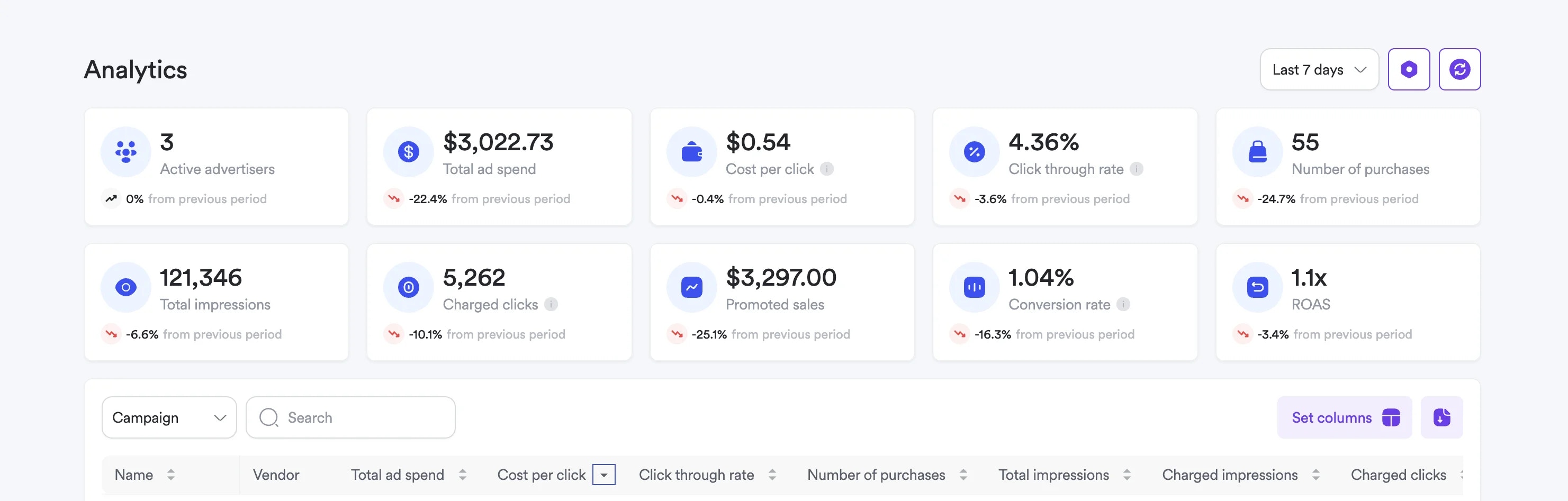
We’ve introduced a dedicated Analytics tab in Self-Service, providing vendors with transparent, actionable campaign performance data. This enhancement gives advertisers the visibility they need to optimize campaigns, allocate budgets effectively, and build trust in the platform.
Key Benefits
Transparent Reporting: Access comprehensive campaign metrics without dependency on support or manual reports Campaign Optimization: Identify what’s working and adjust strategies based on real performance data Budget Confidence: See exactly how advertising spend translates to results and ROI Agency Engagement: Strengthen vendor relationships with transparent, self-service analytics Actionable Insights: Make data-driven decisions with detailed performance breakdownsAnalytics Features
Performance Overview
- Aggregated Metrics Tiles - Key performance indicators at a glance
- Campaign-Level Breakdown - Individual campaign performance analysis
- Timeframe Filtering - Custom date ranges for targeted analysis
- Export Capabilities - Download performance data for external analysis
Advanced Functionality
- Search by Campaign Name - Quickly find specific campaign data
- Sortable Metrics - Order campaigns by performance indicators
- Customizable Columns - Configure which metrics to display
- Data Export - Download comprehensive performance reports
Using the Analytics Tab
- Access Analytics - Navigate to the new “Analytics” tab in the Self-Service Dashboard sidebar
- Review Performance Overview - View aggregated metrics across all campaigns
- Filter by Timeframe - Select specific date ranges for analysis
- Analyze Individual Campaigns - Drill down into specific campaign performance
- Export Data - Download detailed reports for further analysis
Analytics Interface
The Analytics tab provides:- Performance Tiles - Quick overview of key metrics
- Campaign Table - Detailed performance breakdown by campaign
- Search and Filter - Easy navigation through large campaign lists
- Empty State Handling - Clear messaging when no data is available
The Analytics tab is will be available in the Self-Service Dashboard this week. This feature provides the transparency and insights needed to maximize campaign performance and make informed advertising decisions across your retail media campaigns.